


Black Friday Sale
28-Week Robotics Course
One project a week, from wiring a first LED to building & coding a self-driving robot car. A complete at-home curriculum, plus a personal instructor to answer any question.
- Ages 8+, no experience needed
- Learn coding, circuits and sensors
- Build logical thinking and problem solving
- Personal instructor for every question
What's included
- 28-Week CurriculumDesigned by robotics professors. Kids learn to think like engineers. Lifetime access.$199
- 60+ Piece Robotics KitProgrammable main board, ultrasonic sensor, OLED screen, motors and more.$139
- Personal InstructorAny question answered within 24 hours. Lifetime instructor support.$129
- Certificate of CompletionAwarded when your kid completes the curriculum.$25
- Express ShippingShips next day.$9
Total value
$501
Black Friday Sale
$178Save $323
Get the Course + KitGiving it as a gift? The course activation code is in the box and never expires.
30‑Day Money‑Back GuaranteeNot a hit? Full refund, even opened.
How does the course work?
After you order:
- Your kit ships the next day. 60+ pieces, plus a card with your course code.
- Unlock the curriculum. Enter the code on our course site to unlock all 28 projects, each with video lessons, wiring diagrams and written guides. Lifetime access.
- Get lifetime instructor support. Whenever your kid gets stuck, their instructor replies within 24 hours.
We suggest one project a week, but your kid can go at their own pace.
What age is it for?
Ages 8+. The curriculum starts from zero, so your kid doesn’t need to know any coding or electronics.
Can my kid do it on their own?
Yes. Every project comes with a video lesson, wiring diagrams and a written guide made for kids to follow. If they get stuck, their personal instructor replies within 24 hours.
Is it safe? Is there any soldering?
It’s safe, and there’s no soldering. Every part plugs in and only fits one way. The robot car runs on 7.4V rechargeable batteries, too low to give anyone a shock, and it never plugs into the wall.
What if it doesn’t work out?
Send it back within 30 days for a full refund, even if it’s been opened or used.
Projects your kid will build
They build it, code it, and watch it come alive.
-
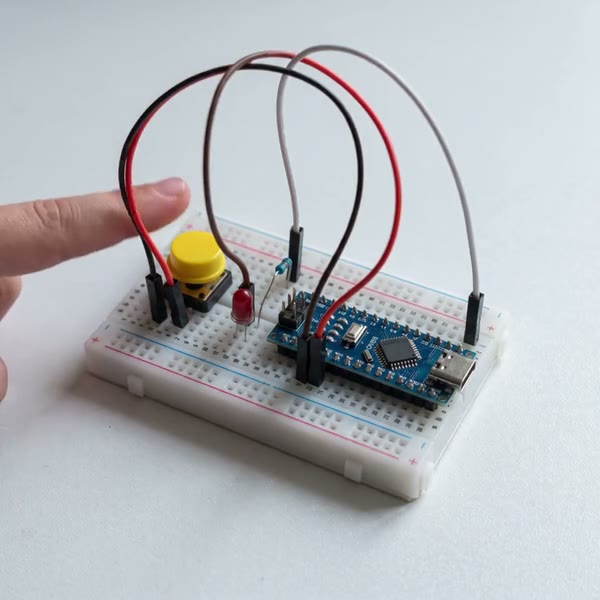
Week 3Button-controlled LED
-
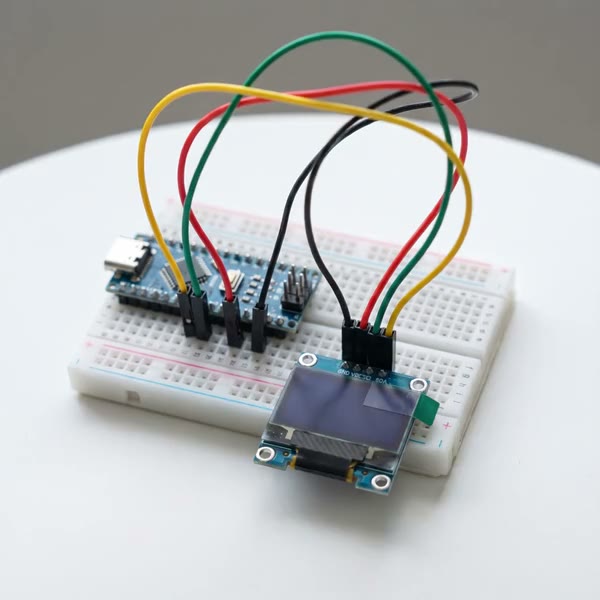
Week 7Code its first screen
-
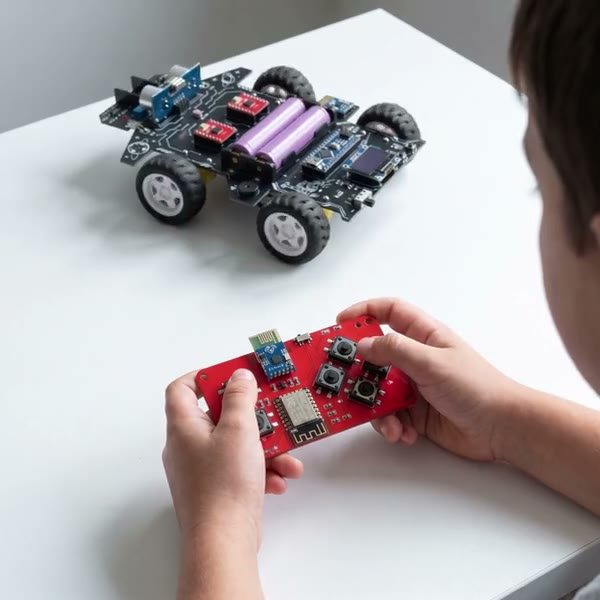
Week 10Code it to obey your remote
-
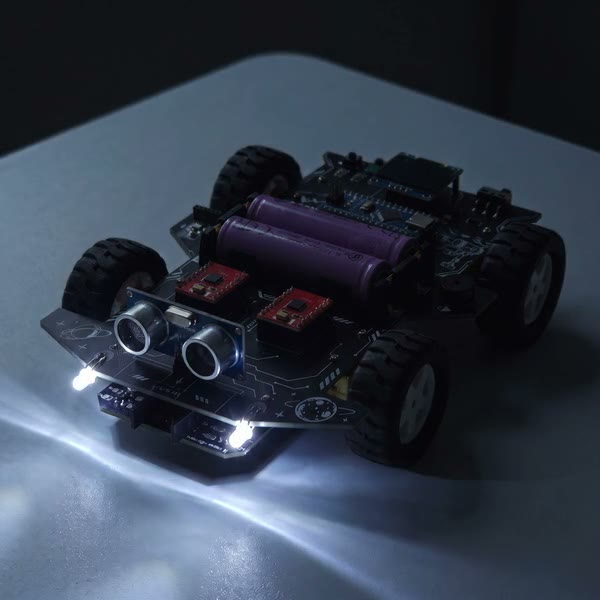
Week 15Lights up by itself in the dark
-
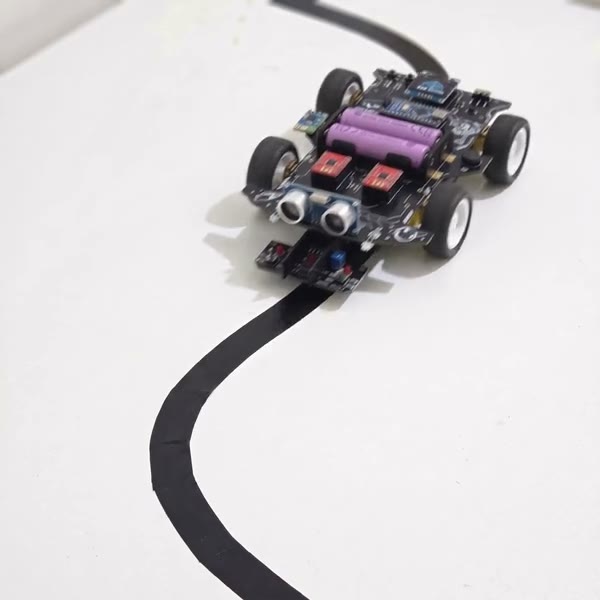
Week 18Follows a line by itself
-
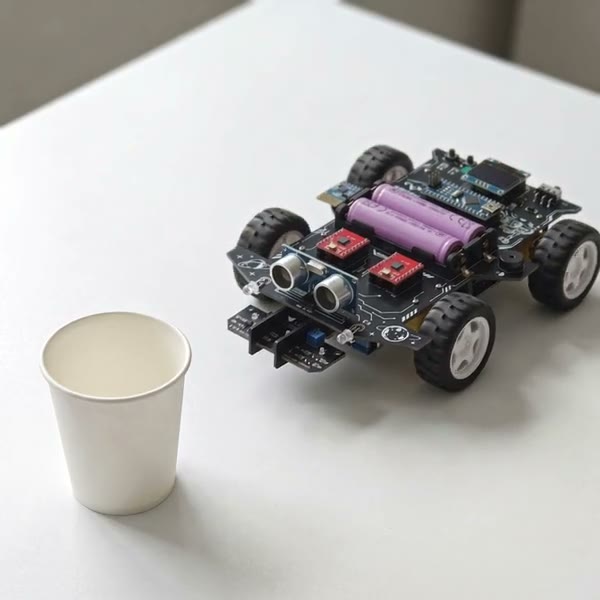
Week 21Dodges obstacles by itself
Can my kid really do this?
Yes. It’s built for complete beginners.

28 weeks, from basics to advanced
Course highlights
- A video lesson for every project
- Teaches why, not just how
- Every line of code explained
- A bonus challenge every week
- Self-paced, lifetime access
- Your kidMy buzzer won’t beep, and I don’t know why.
- Boris · InstructorLet’s find out! Your code uses pin D12. Is the buzzer wire in D12?
- Your kidOh, it was in D11. Moved it, and it works now!
- ✓ Solved
Not every kid loves lessons. Every kid loves a story.
So we made the whole course one. Professor Sam is stranded on Mars, and each week your kid builds the next part of his rescue rover.

Professor SamRed Rock Outpost
00:00
- Help! Can anyone hear me?
- It’s Professor Sam. I’m trapped at Red Rock Outpost. Meteors crushed my car!
- There’s a rescue rover kit on your lab shelf, Engineer.
- Build it and come get me. I’ll call every day and show you how!

Professor Sam is stranded on Mars after meteors wreck his car. Each week, your kid builds and codes the next part of the rover that will bring him home.
Here’s the plan, Engineer.

Act 1 · AwakeningWeeks 1–7
First, practise each part on a breadboard, like a pilot training in a simulator.

Act 2 · DepartureWeeks 8–16
Build the real rover and teach it to obey your remote. Then add speed control, lights and a siren.

Act 3 · AutopilotWeeks 17–21
Now teach it to drive itself: follow the energy track and steer around meteorites.

Act 4 · RescueWeeks 22–24
Then switch on autopilot and come and get me. I’ll be at the window, waving!


See all 28 lessons Hide the full course
Learn each part, then build the rover
They light an LED, read buttons and sensors, and put messages on the OLED screen. Then they build the rover, with no soldering.
- 01 Workstation SetupInstall the free Arduino IDE and upload their first code30 min
- 02 Life SignalLight an LED with code40 min
- 03 Comms ButtonRead a button press40 min
- 04 Storm SirenSound an SOS alarm with the buzzer40 min
- 05 Solar SenseMeasure light with a light sensor45 min
- 06 Radar EyesMeasure distance with ultrasound45 min
- 07 DashboardShow messages on the OLED screen45 min
Bring it to life and drive it
They test the motors, code it to obey the remote, and add speed control, a battery gauge, lights and a siren.
- 08 Assembly DayBuild the rover, no soldering60 min
- 09 Engine TestRun each motor forward and back40 min
- 10 Steering WheelCode it to obey the remote45 min
- 11 Free DriveDrive curves and S-bends40 min
- 12 Throttle and CruiseShift between two speeds45 min
- 13 Power GaugeShow the battery level45 min
- 14 Lights and SirenHorn, headlights and signal lights50 min
- 15 Auto HeadlightsLights that switch on in the dark45 min
- 16 Smart LightsTurn signals, reversing beeps and brake lights50 min
Teach it to drive itself
They code it to follow a track, run a course they design, and steer around obstacles on its own.
- 17 Ground SensorsRead the line sensors45 min
- 18 AutopilotFollow a track on its own, through 90° turns and S-curves90 min
- 19 Track DesignerDesign a track with checkpoints and a finish line60 min
- 20 Radar TestBack away from obstacles60 min
- 21 Meteor FieldDrive itself around obstacles60 min
Bring Sam home
They switch between remote and autopilot, then run the rescue mission. They name their rover and graduate with a certificate.
- 22 Dual ModeSwitch between remote and autopilot45 min
- 23 Final Mission: Mars RescueEverything they built, working together90 min
- 24 Mission CompleteName the rover, show it off and earn a certificate45 min
Free bonus lessons, with more to come
Fun extras with the same kit: a jukebox, a game console, a reaction duel and an air piano. We keep adding new ones for free, and there’s nothing else to buy.
- 25 Rover JukeboxPlay songs on the buzzer
- 26 Flappy ConsoleCode a game on the screen
- 27 Reaction DuelTime their reactions, solo or head to head
- 28 Air PianoPlay notes with a wave of the hand
3,000+ Happy Families
Excellent4.8
What Parents Are Saying

Bought this for my two kids and they’ve really got into it. They love finding out what happens next with Sam, and I like how the lessons build on what they’ve already learned. There’s clearly a lot of thought behind it, and they’re picking up robotics while having a great time with the rover together. Really glad we bought it, definitely recommend!
VerifiedLauren Mitchell

My daughter absolutely loved this gift. She needed a bit of help getting started, but once she got something working she wanted to show everyone in the house. Hearing her explain what she’d done, in far more detail than any of us expected, was lovely. She’s clearly quite proud of herself.
VerifiedRob T.

I have no electronics background and was a little concerned I'd be the one sitting there unable to help. My son and I have been watching the videos together, pausing a lot, and checking our wires against the diagrams. We're still on the earlier lessons. Getting a light to blink doesn't sound like much, but he called his mother in to see it. Then we had to do it again. I like that we're getting these little things working before trying to make the whole rover do everything. There is quite a bit left for us to get through.
VerifiedMartin Ellis


Is it worth $178?
What learning robotics usually costs.
Sources: idtech.com and create-learn.us.
Roboford AcademyFor all 28 weeks
$178
- 28-week robotics curriculum
- 60+ piece robotics kit, in one box
- Lifetime instructor support, replies within 24 hours
- 30-day money-back guarantee
About $6 a week, kit included
Any last questions?
How does the course work?
After you order:
- Your kit ships the next day. 60+ pieces, plus a card with your course code.
- Unlock the curriculum. Enter the code on our course site to unlock all 28 projects, each with video lessons, wiring diagrams and written guides. Lifetime access.
- Get lifetime instructor support. Whenever your kid gets stuck, their instructor replies within 24 hours.
We suggest one project a week, but your kid can go at their own pace.
What age is it for?
Ages 8+. The curriculum starts from zero, so your kid doesn’t need to know any coding or electronics.
Can my kid do it on their own?
Yes. Every project comes with a video lesson, wiring diagrams and a written guide made for kids to follow. If they get stuck, their personal instructor replies within 24 hours.
Is it safe? Is there any soldering?
It’s safe, and there’s no soldering. Every part plugs in and only fits one way. The robot car runs on 7.4V rechargeable batteries, too low to give anyone a shock, and it never plugs into the wall.
Can siblings share it?
They can, and one course account covers the whole family. But with one kit, someone’s always waiting, and finished builds have to come apart for the next turn.
The good news: every additional kit is 35% off, so each kid gets their own rover to build, keep and be proud of.
How long does each lesson take?
Most lessons take 40–60 minutes. The setup lesson takes about 30 minutes, and the final rescue about 90 minutes. There’s no schedule, so your kid can go at their own pace.
Does course access expire?
It never expires. Your kid can come back to any lesson whenever they want.
See 3 more questions
What kind of computer do we need?
A Windows or Mac computer. Your kid writes the code there and uploads it to the rover. iPads and phones won’t work for this.
Prefer your kid offline? You only need the internet once, to download the software at the start. After that, the whole course works offline.
What’s in the kit?
Everything to build and code the rover, 60+ pieces in all, including:
- The main board, 4 motors and wheels
- Distance and line-tracking sensors, plus a small screen
- A pre-built wireless remote
- 3 rechargeable batteries and a charger
- A USB-C cable, a screwdriver and black tape for making tracks
- Your course activation card and a top-secret mission letter
All you add is a Windows or Mac computer.
When will it arrive?
Your kit ships the next day, weekends included, with free worldwide shipping. It usually arrives 7–10 days later.
Still wondering? Email us: support@roboford.com
Customer reviews
4.8
Excellent
485 Reviews
98% Recommend
485 Reviews
-
Daniel Parker
Minnesota
I was mostly interested in the rover when I ordered this and didn't think much about the earlier circuit lessons. Those have turned out to be useful. My son can now point to the button or sensor and explain what he expects the program to do. We don't always get the result we expect, which leads to another look at the instructions. Having a next lesson to go to is helpful too. Otherwise I suspect we'd have built it and then wondered what to do with it.

-
Michael Anderson
California
I bought this because my son kept asking about building a robot and I had no idea where to start. We've been doing the early lessons together. I do have to remind him to slow down and check the wiring, he's keen to get everything working straight away. The course has been useful for me as well because I can follow what he's meant to be doing. We're taking our time with it, usually just sitting down with it on the weekend.

-
Matthew Harris
North Carolina
A good weekend project for us. I ended up getting more involved than I’d planned, but honestly I enjoyed it too

-
Jessica
Florida
Ok the little 'HI MOM' message made my day ❤️ Had to take a picture of this one

-
Laura Bennett
Massachusetts
The distance sensor clicked for my daughter when we moved an object closer and watched the reading change. Before that, she just thought the robot somehow “knew” something was in front of it.


Daniel R
Georgia
He got all three lights working! Very pleased with himself. Nice little project

Angela Davis
Washington
Wasn’t sure whether my kid would be into this. Happy to say it’s getting used, which isn’t always the case with things I buy.

Susan Miller
New York
A gift for my granddaughter, who is always making things. She showed me the wires and some code when I visited, most of which went over my head. Her parents are helping her with it. I can't tell you much about the software, but I can tell you she had a great deal to show me.

Kevin
New York
A present for my grandson. He's been keeping me updated on what he's building, which I love. His parents say the course is going well.

Ryan Spencer
Oregon
My kid has started calling himself the engineer. I'm apparently just there to hold things

Kenji S.
Texas
Adult beginner, bought for myself. I normally make things out of wood, so the electronics are new territory. A few notes after working through the first projects:
- The breadboard took me a bit to understand. Once I'd wired a couple of circuits, the layout made more sense.
- I use the diagrams constantly. They're what I go back to when I'm unsure.
- I've started writing down what I changed in the code and what happened. Otherwise I forget which version did what.
- The space story isn't why I bought it. Having a course to follow is.
Happy with the purchase. I have the button and light projects working and am on to the sensors.
Eric Navarro
Kentucky
My nephew opened this at his birthday party and wanted to start right then, in the middle of everything. We waited until the next morning. I thought we'd be building the car immediately, but we started with the smaller circuit projects. That actually gave us a chance to get comfortable with the pieces. He's very much a 'what does this one do?' kid, so there were a lot of detours. We haven't reached the rescue yet. Last time I visited he wanted to show me the buzzer, several times, from different rooms.

Clara W.
Texas
My son has appointed himself the driver and me the obstacle. Seems fair

Jason Reed
Washington
I had pictured more time building and less time at the laptop. We move between the computer and testing the rover on the floor, back to the computer, then another test. My son is happy with that. I wanted an activity with less screen time.

Thanks for sharing this, Jason. We understand you were hoping for less laptop time. Coding is part of the course, but shorter programming sessions followed by hands-on testing may suit your family better. If you'd like help planning that balance around your current lesson, please get in touch. We'd be happy to work through it with you.
Contact our support teamJames Walker
California
We don't manage a lesson every week. Sometimes he does a bit in the evening, sometimes we leave it alone for a while. Being able to pick it up again without booking a class or rearranging the week is a big plus for us

Ashley Clark
Ohio
My daughter is having a great time with this!! She likes the building and the little experiments, and she's been telling everyone she's learning robotics. I do sit with her for some of it (we're both new to this). Very glad we gave it a go

Jessica Evans
Missouri
My son is much more invested in the Mars rescue than I am. He keeps explaining where we are in the story as though I've missed an episode of something. I just follow his instructions and help with the laptop.
Nina Shah
Oregon
A few of the small screws were missing from ours. We got some of the build done before noticing, then put it aside. Nice idea for a project, just a bit of a stop-start beginning.
We're sorry missing screws interrupted your build, Nina. You shouldn't have to put the project aside because parts are missing. Please email us your order number and a photo showing which screws you need. Our team will help identify the parts and work with you on getting the build moving again.
Contact our support teamBethany Wu
Georgia
For anyone looking at ages in the reviews: my son is ten, no previous coding. He likes the building and the Mars story. The code needs more explanation from me, even with the guide, so this hasn't been an entirely independent activity for him. That's been fine as a birthday project.
I chose it because he already has remote control cars and I wanted something with more to do. We're at the motor lessons now. He can upload the program himself; I still check the connections with him.

Claire Dawson
Tennessee
We have it moving now, but getting there took more help from me than I'd planned. My daughter enjoys the building. The code is where we slow down and read things a few times. A bit difficult for us as a first kit.
Thank you for being honest about the learning curve, Claire. We're glad the rover is moving, and we're sorry getting there needed more help than you expected. Please send us the lesson you're working on and the code section that's unclear. We'd love to walk through it with you in smaller, manageable steps.
Contact our support teamGeorge Ellis
Colorado
My son does more of the programming and I prefer putting things together. We've divided it up that way. There's more coding here than I personally wanted.
Thanks for the feedback, George. We understand the amount of coding wasn't quite what you had in mind. It's lovely that you've found a way to share the project with your son. If a programming step is getting in the way of enjoying the build together, let us know which lesson you're on and we'll help you work through it.
Contact our support teamRobert Finch
Pennsylvania
Set this up at the end of my workbench with an old Windows laptop. It's there when my granddaughter visits. I handle the parts and she handles the computer
Heather Thompson
Idaho
I chose this partly because engineer support is included. Haven't needed to contact anyone yet, so I can't review that side of it. At the moment my daughter follows the videos and I mostly help keep the parts from disappearing under the table.
Hannah Tate
Washington
My nephew won't let anybody else touch the remote

Michael Turner
Tennessee
Today's entire activity was changing the speed, driving a bit, changing it again. I had the next lesson ready but apparently we weren't done with this one

Angela Ortiz
Colorado
He's already picked a spot for the certificate. We have a ways to go
Tom Gallagher
Washington
I'm the one learning with this, no kids involved. Always wanted to understand what a breadboard was actually doing. Following the wiring and then changing the code has finally made it click for me. My setup is currently taking up most of the kitchen counter.
Fiona Murray
New Mexico
I didn't realize how useful being able to pause a video would be until we had wires all over the table. We stop it, compare ours with the guide, then continue. Nobody has to remember a whole set of instructions at once. That's very much our speed.
Amy S.
Colorado
We assembled the rover on Sunday. I sorted the pieces and read out the steps, my son handled most of the screws. He didn't want me taking over. Fair warning to parents who like building things themselves.
The wiring took more attention than the wheels. We checked each connection against the picture before going on, which involved a fair amount of me saying 'hang on, let me see that.' He was much less patient about that part. Once it was together he carried it around the house showing everyone, including his sister, who had already seen the entire build.
Julia Santos
Kentucky
I thought my son could do more of this on his own. We both needed quite a while to understand the connections, and the programming was harder for us. We've packed it away for the moment. May come back to it when I have more time to help.
We're sorry this felt harder to tackle independently than you expected, Julia. Taking a break is completely understandable. Whenever you're ready, please send us the lesson where you stopped and what was confusing about the connections or code. We'd be happy to help you and your son find a manageable starting point, at your own pace.
Contact our support teamRebecca L.
Vermont
The mission letter was a nice touch. My son kept it
Brooke Taylor
Oregon
The best bit was getting it moving for the first time. Everyone in the house had to come and look
Natalie Hayes
Ohio
The rover was the reason we bought it. The air piano was the unexpected favorite. Nice to have a few other things to do with the same parts.
Ethan Morales
Utah
The remote is currently my son's favorite part. Mine was watching him work out which bit of code changed how the rover moved. We disagree about the ideal driving speed. He would like me to stop commenting from the sofa.

Chris Walker
Nebraska
Bought this for myself. I'm an adult, which probably isn't the main audience, but I've been meaning to try Arduino for years and never got much further than having twelve browser tabs open and no idea what parts to order. Having the course and the parts together was the appeal. The Mars story is clearly aimed at kids. I don't mind it, though I spend more time on the wiring diagrams and code explanations. So far I've been doing each example first, then changing something small to see what happens. I understand the button and light experiments better after actually wiring them up. Still a beginner, still checking the diagrams constantly, but at least I'm finally making something.
Rebecca Hart
Washington
The Mars rescue story worked on my son. He wanted to know what Sam needed next. I thought he’d skip those parts, honestly.
Julia Henderson
Arizona
Pretty pleased with it. We had to watch a couple of parts again, but the instructions were easy enough to follow

Adam Price
New York
Probably a better fit for someone with a little coding experience. We're complete beginners and haven't got very far yet. Setting aside more time might help.
Thanks for letting us know, Adam. We're sorry the first steps have felt too difficult. Please tell us which lesson you're on and where you're getting stuck; a photo of the wiring or the exact error message can help us understand the problem. We'd love to guide you through one small step at a time.
Contact our support teamPriya N.
New Mexico
Still on the LED lessons. She changed the blink timing and made me watch both versions to decide which was better
Olivia Stone
Nebraska
We've replayed the same lesson twice. Second time she wanted to do everything herself

Andrew Patel
Ohio
Software developer here. The C++ was part of the appeal. My daughter and I have been working on the display: edit the text, upload, check the screen. It's a useful little exercise because there's an obvious result to check. She does need help with the syntax. I wouldn't expect a beginner to recognize a missing bracket straight away. We've left her version of the message in the program.
Brian Foster
North Carolina
My son keeps changing the black tape route instead of moving on to the next lesson. Apparently the first route was too easy. There are now several turns between the table and the door.

Nicole Peters
Texas
The Mars story is what got my son interested. He wanted to help Sam, so getting the rover working actually meant something to him
Luis Romero
Wisconsin
My eight year old needs me beside him for the instructions and wiring. He likes the Mars story and wants to upload the code himself. I expected to be able to step away more than I can so far
Thanks for sharing your experience, Luis. We understand you expected your son to need less hands-on help. Please let us know which instructions or wiring steps are proving difficult. We'd be happy to explain those with you and help you find a pace that feels comfortable for both of you.
Contact our support teamWalter Jensen
Texas
Retired guy here, bought it for myself. I used to take radios apart but never learned much programming. So far I've been working through the circuit lessons at the kitchen table. My wife would like the table back. I need a hobby desk
Priya Shah
Wisconsin
We've been using this for our science time at home. I ask my daughter to explain what she's changed before she runs the program, mainly so I can keep up. The if/else lesson gave us a lot to talk about: what should happen when the condition is true, and what should happen otherwise. Sometimes she draws it out on paper first. We don't do that for every lesson, just when she has an idea she wants to work through. I like having an actual light or motor to point at while we're discussing it. The rover is gradually coming together.
Amanda P.
Pennsylvania
Nice kit, glad there's no soldering involved

Paul N.
California
Our kit was short a couple of the pieces used to fasten the board. I didn't have anything the right size at home. We were ready to build that afternoon, so it was disappointing to have to stop there
We're sorry the missing fasteners brought your afternoon to a stop, Paul. That is a frustrating start, especially when you were ready to build. Please email us your order number and the assembly step showing the missing pieces. We'll help identify exactly what's needed and work with you on the next steps.
Contact our support teamVictor D.
Indiana
Enjoyed the build

Marcus Bell
Utah
This was a gift for my niece, and I promised I'd help her get started. I assumed that meant holding a few pieces while she built it. We ended up at the laptop together, taking turns figuring out what the code was telling the hardware to do. She's much less worried about changing something than I am. I tend to reread the instructions; she wants to try it and see. We've found a workable middle ground. I left her with the kit, but I've been getting very detailed updates about what Rover-1 can do now.
Steven Brooks
South Carolina
Bought as a birthday present. The packaging looked nice, but I was more interested in whether it would get used after the birthday. We’ve been working through it together on weekends

Olivia K.
Minnesota
Worth it for the look on his face when the wheels finally moved

David Chen
California
Check the computer requirement. Our son's iPad can't do the coding part, so we use the family Windows laptop.
Thanks for flagging this, David. We're sorry the computer requirement came as a surprise. We understand that having to share the family laptop can affect your plans. If you need help with the setup or uploading code on that laptop, please get in touch and we'll walk through it with you.
Contact our support teamKate Robinson
Virginia
Bought this as a gift and it went down well. They wanted to open it and get started straight away.
Emily Carter
Oregon
Putting her own message on the little screen got a surprisingly big reaction. We changed the motor speed too. Small edits, but she could actually see what her changes to the code did.
Claire Morgan
California
We sometimes leave a project alone for weeks. Having the course without a subscription matters to me. We've come back to this one a couple of times.
Denise M.
Missouri
My daughter would happily spend all her time putting the rover together. Getting her to sit down for the C++ is another matter. I have to encourage her through that part, and we do less at a time than I originally had in mind. The explanations give us something to work through together, but they don't make her suddenly prefer coding to building. We've split the coding across several sittings. The build is the part she asks to come back to.
Thank you for sharing this, Denise. We understand that enjoying the build doesn't automatically make the C++ feel enjoyable too. Short sessions and one small code change at a time may feel more manageable. If there's a particular explanation your daughter is finding difficult, send it to us; we'd be happy to help you work through it together.
Contact our support teamJulian Hart
Iowa
The code explanations are the part I was looking for. I can usually copy instructions and get something working, but then couldn't tell you why it works. Going through the lines has made me slow down a bit. Useful for me as well as my son.
Grace H.
Michigan
The light sensor lesson went down well! My son kept covering it with his hand, then moving his hand away and telling me what would happen. He knew exactly what he wanted to show me.
Kevin Brooks
Colorado
I'm mainly working from the written steps. If I need to check where a wire goes, I'd rather look at the guide than find that moment in a video again. The videos are there when I want to watch the process, but going back and forth in them isn't how I like to work.
The code is taking me longer. I'll read an explanation, think I've understood it, then read it again before carrying on. That's where most of my time goes. I'm glad there are both formats, though I hadn't expected to rely on the written one quite so much.
Thanks for the thoughtful feedback, Kevin. It makes sense to keep the written diagrams close by, and we're glad that format is useful to you. If a code explanation still feels unclear after another read, please send us the lesson and the lines you're looking at. We'd be happy to talk through what they do and why.
Contact our support teamMark H.
Georgia
I have no electronics background and was a little concerned I'd be the one sitting there unable to help. My son and I have been watching the videos together, pausing a lot, and checking our wires against the diagrams. We're still on the earlier lessons. Getting a light to blink doesn't sound like much, but he called his mother in to see it. Then we had to do it again. I like that we're getting these little things working before trying to make the whole rover do everything. There is quite a bit left for us to get through.
Alina K.
South Carolina
Too advanced for us right now. I underestimated how much help I'd need to give with the coding, and I don't know enough to get us past the part we're stuck on. It has mostly stayed in the box.
We're really sorry you're stuck, Alina. Not knowing how to help with the code can make the whole project feel out of reach. Please send us the lesson you're on and what happens when you try it, including any error message. We'd love to help you find a smaller next step so you don't have to figure it out alone.
Contact our support teamPatrick Sullivan
Idaho
Covering the light sensor to make the headlights come on was a favorite here. We also spent quite a while making the buzzer beep. Quite a while
Elena Rossi
Washington
Great rainy weekend project!

Andrew Cooper
Massachusetts
I wanted to get straight to building the rover. The smaller circuit lessons made more sense later, though. When we got to remote control and then driving itself, we were using things we’d already tried separately

Nadia Ahmed
California
Bought for the robot, turns out the buttons and buzzer are pretty entertaining too

Jason M.
Arizona
The shipping carton was dented and the orange case had a scuffed corner. Everything we unpacked looked okay. It was a gift, so I would have preferred the case to arrive in better shape
We're sorry the case arrived scuffed, Jason, especially as this was a gift. Thank you for checking the contents, but we understand the presentation matters too. Please email us your order number and photos of the case and shipping carton. We'll review the damage with you and help work out an appropriate next step.
Contact our support teamTom W.
Michigan
Before dinner was the wrong time to start this. We kept stopping to try things and then needed the table back. Next time I'm leaving it for the weekend
Peter Lawson
Indiana
This stays at my house for when my granddaughter comes over. That was the agreement when I bought it, although she has made a few attempts to take it home. She's nine and quite interested in the computer side of it. I am not particularly good with computers. She gets the lesson up for us and I make sure we've found the right pieces.
Last visit she brought a notebook with a drawing of the rover in it. She had drawn the sensors as enormous eyes. We spent a while talking about which bits were on her drawing and which bits were actually in the box. Then she wanted to do the lesson with the little screen. She likes that one. I was hoping to get back to the building, but it was her afternoon.
Her dad usually collects her around five. This time he came in to have a look and stayed for tea. I left the kit out because he wanted to see the instructions too.
Rachel Bennett
Florida
The little screen has been the surprise favorite here. My son wanted to put his own message on it before doing anything else. We have spent a lot of time on that one part

Melissa Grant
Virginia
The obstacle lesson was a hit! My daughter had the rover going while her brother kept putting a cereal box in its way. When it turned away, they'd move the box and try again. I got called in to watch at least four times. This is the first lesson he's wanted to join in with.

Joanne Ellis
Iowa
My son wanted the rover driving immediately. The smaller projects took some patience. He's starting to see how they fit together now, but we had to slow things down at the beginning.
Thanks for sharing this, Joanne. We understand the smaller projects can feel like a long wait when your son is eager to drive the rover. We're glad the connections are starting to make sense. If an early lesson is holding you up, tell us which one and we'd be happy to help make the next step clearer.
Contact our support teamMegan Wilson
North Carolina
Slower going than I expected. We don't get it out much on school nights. Glad the course doesn't expire, because we're going to need a while to get through it.
Thanks for letting us know, Megan. We understand it can be difficult to fit a project into school nights, especially when progress takes longer than expected. There's no need to rush. If you'd like help breaking your current lesson into shorter sessions, please get in touch; we'd be happy to help you find a pace that works for your family.
Contact our support teamDiane K.
Florida
Adult beginner. Enjoying the circuits and coding, mostly skipping the rescue story
Kevin Wallace
North Carolina
Glad we bought it. We’re taking our time with the lessons, but it’s been fun having something to come back to together.

Christine Moore
California
The calls from Sam are a favorite here. My son actually tells us to be quiet so he can hear what the mission is.
Caroline Lewis
Vermont
We’ve only done a few lessons, so still early days. So far it’s been a nice thing to work on after school.
Tess Morgan
Texas
The case arrived with a broken hinge and some of the contents loose in the carton. I can't tell whether anything else was damaged in transit, so we haven't started assembling it. This rating is for the condition it arrived in.
We're very sorry the case arrived with a broken hinge and loose contents, Tess. That isn't the start we want for you. Please email us your order number and photos of the case, packaging and any parts you're concerned about. We'll help assess what was affected and work with you on the next steps before you begin assembly.
Contact our support teamOwen Reed
California
Only three wheels in our box. We checked all the bags twice. Haven't been able to finish the rover yet
We're sorry a missing wheel has kept you from finishing the rover, Owen. Thank you for checking the bags carefully. Please email us your order number and a photo of the wheels you received. We'll help confirm the missing part and work with you on getting your build back on track.
Contact our support teamNicole R.
Illinois
Only a few lessons in, enjoying it so far
No reviews match this filter.
Our promise
30‑Day Money‑Back Guarantee
Open it → Build it → Try it
Not a hit? No problem. Send it back within 30 days for a full refund, even if it’s been opened or used.
— The Roboford Academy team
From a first LED to a self-driving car.
Get the Course + KitOne‑time payment · Lifetime access · 30‑day money‑back